

- Who it's for
- Buyers whose stone has been delivered, handed over or placed in custody in their name.
- What you need ready
- The stone, and its lot page or passport to compare it with.
- For a dispute: the written conclusion of a gem lab or a jewelry store of your choice, as a file: JPG, PNG, HEIC or PDF, up to 8 MB.
- How long it takes
- 48 hours from the moment the stone reaches you — longer if the desk extends it.
- What it costs
- Confirming or raising a dispute costs nothing on Everystone.
When your check starts
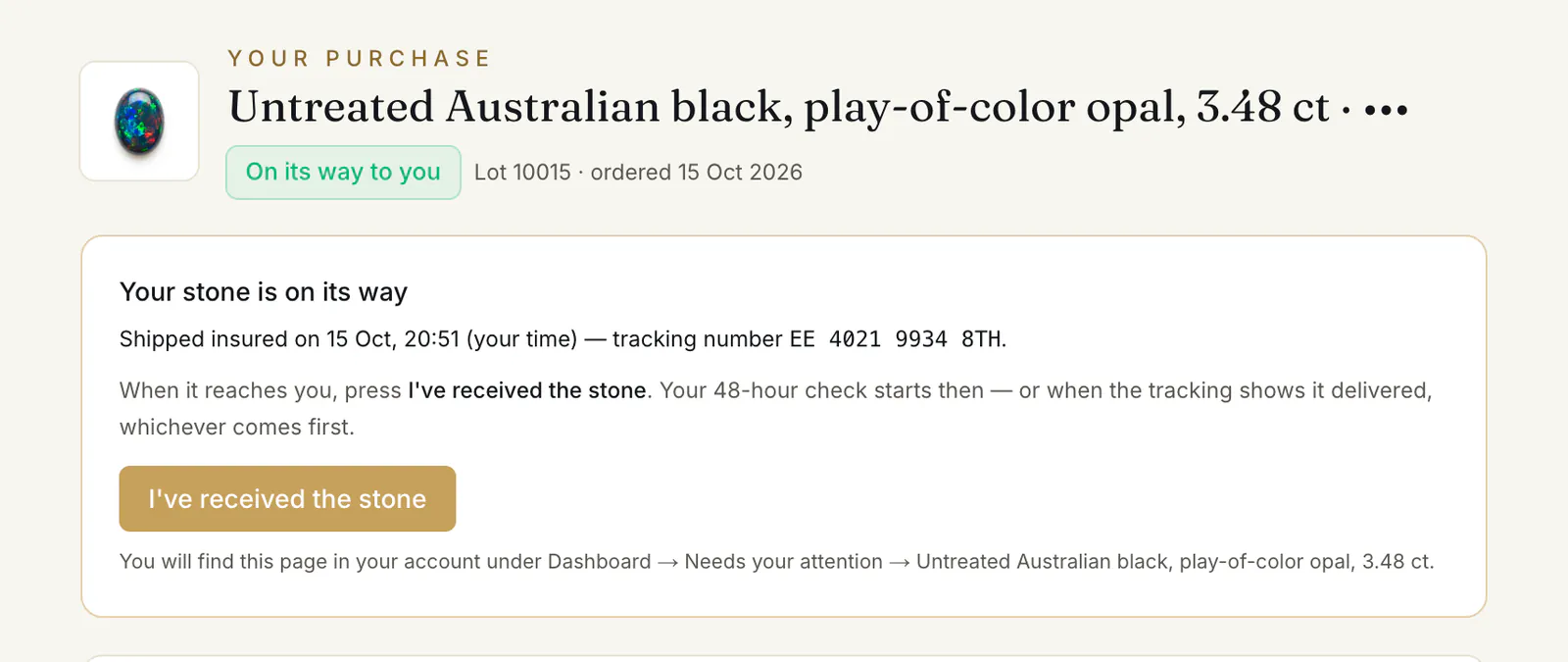
Once the stone is shipped or handed over to you, press I've received the stone ③ on your order page when it is in your hands. Your check starts then — or when our desk sees from the tracking that it was delivered, whichever comes first. Your order then shows “Received — your 48-hour check” (for a stone placed in custody in your name, “In custody — your 48-hour check”), and a letter tells you so. The order page gives the exact end: “You have until” a date and time, in your own time zone.
Compare the stone with its listing: the facts on your order page under “The stone”, its check marks, and its passport if it has one.
Confirm the stone
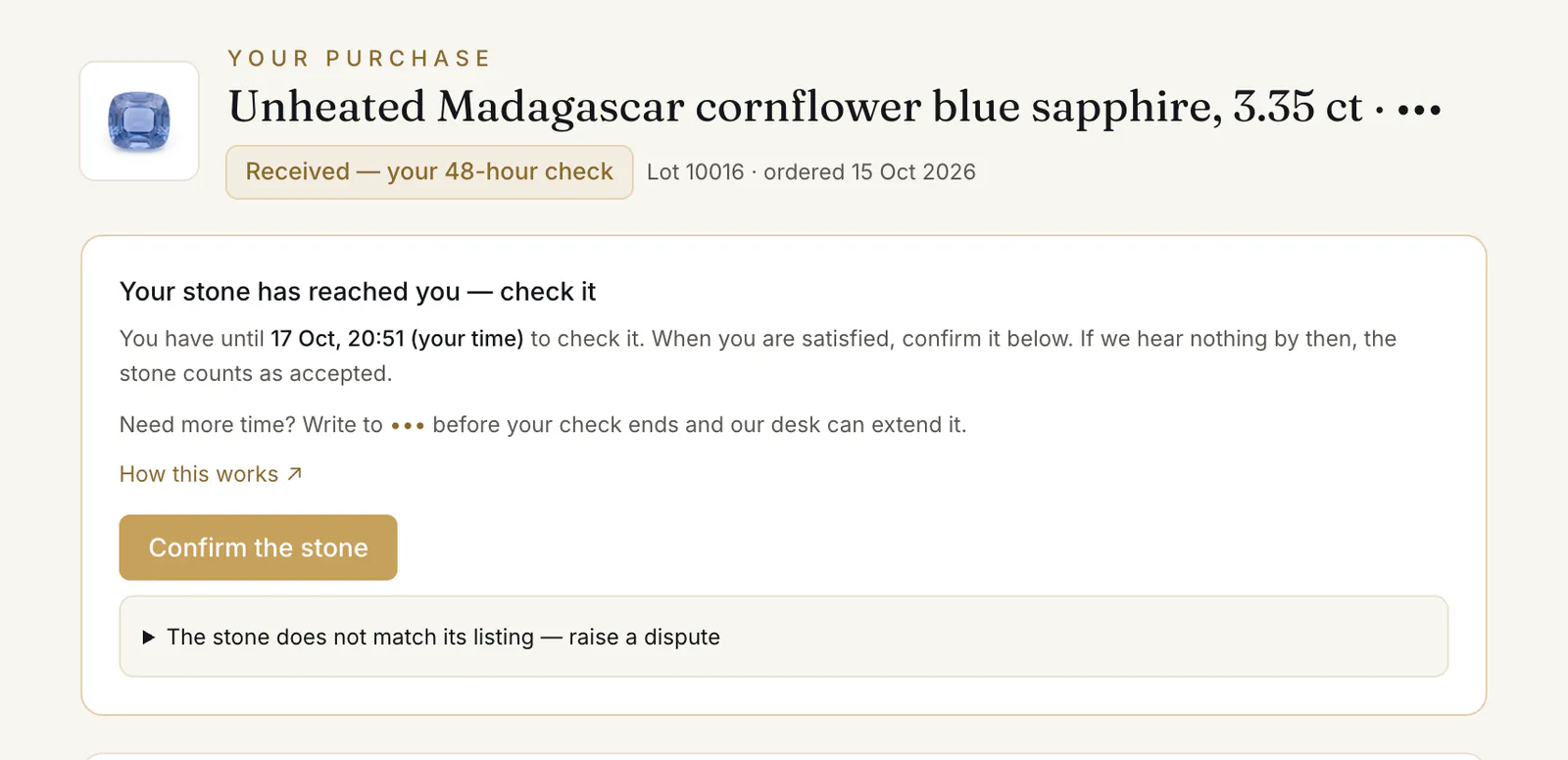
When you are satisfied, press Confirm the stone ②. The order shows “Accepted — the stone is yours” and a letter confirms it. The seller is paid only after this.
If you say nothing: “If we hear nothing by then, the stone counts as accepted.”
Ask for more time
“Need more time? Write to” the address on your order page “before your check ends and our desk can extend it.” Each extension adds 48 hours, and a letter gives you the new end.
For a stone listed by a seller, you can also agree it in the order's deal room: propose More time, and once the seller accepts, our desk moves the deadline.
The clocks of an order, to scale
Before you pay · from the moment you order
- 0–24 h the stone is reserved for you
- 24–48 h choosing the network renews the reservation from that moment — never past 48 hours from your order
- Not paid by then: the order is cancelled and the stone goes back on the shop.
After you pay · from the moment your payment is in
- 0–48 h the seller confirms the stone
- 48–96 h if it takes longer, the latest is 96 hours after your payment
- Not confirmed by then: the order closes by itself and your payment comes back in full.
Once you have the stone · from your “I've received the stone”, or our desk's mark from the tracking
- 0–48 h your check: confirm the stone, or raise a dispute
- 48–96 h more time, if you ask and our desk extends it — 48 hours each time
- No word from you by the end: the stone counts as accepted.
If you dispute the stone · from the return instructions our desk sends you
- 0–48 h send the stone back insured, and enter its tracking and seal numbers
- Not sent by then: the dispute is withdrawn and the stone counts as accepted.
If our desk asks for your identity check · from the request
- 0–48 h send it; once it is with our desk, its decision counts, not the clock
- Not sent by then: the order is cancelled and your payment comes back in full.
Raise a dispute
A dispute is for a stone that does not match its listing. It is not a return for a change of mind.
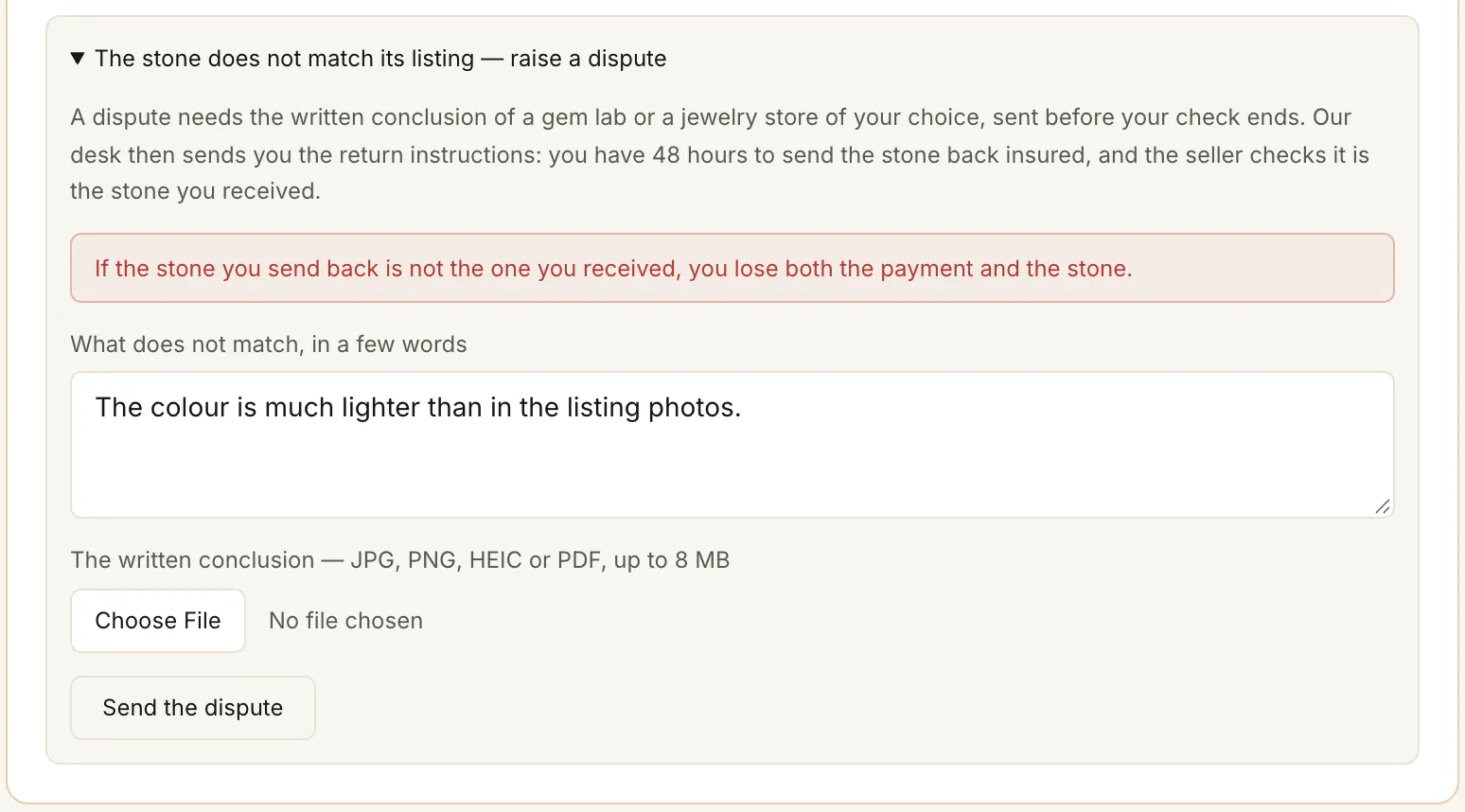
- 1.Take the stone to a gem lab or a jewelry store of your choice, near you, for a written conclusion on it — a PDF, or a photo of it. If you need longer than your check for that, ask for more time first (above).
- 2.On your order page, open The stone does not match its listing — raise a dispute.
- 3.In What does not match, in a few words ①, say what differs (up to 1,000 characters).
- 4.Attach the conclusion under The written conclusion ② — JPG, PNG, HEIC or PDF, up to 8 MB; a photo straight from an iPhone (HEIC) is fine.
- 5.Press Send the dispute ③ — before your check ends.
A dispute: the stone goes back to be checked
Raise it within your check
The stone does not match its listing — raise a dispute, attach the written conclusion of a gem lab or a jewelry store of your choice, Send the dispute.Within your 48 hours“Dispute under review”
Return instructions
Our desk tells you where and how to send the stone back — on your order page and by email. The payment stays held.Send it back
Insured. Enter the Tracking number and the Seal number, then I've sent it back.48 hours“Dispute — send the stone back”
It is checked
The seller — or our desk — checks it is the stone you received.“Dispute — the stone is being checked”
- The same stone“Your dispute is upheld”Your payment comes back in full; the stone stays with the seller.
- Not the stone you receivedShown with proof, and decided by our deskProven, the sale stands: “If the stone you send back is not the one you received, you lose both the payment and the stone.” Not proven, it counts as the same stone.
- Not sent in timeThe dispute is withdrawnThe stone counts as accepted, and the seller is paid.
Your order then shows “Your dispute is with our desk”, and a letter confirms we have it. The payment stays held until the dispute ends.
Send the stone back
- 1.Our desk sends you the return instructions — on your order page and by email. Where the stone goes is the desk's decision.
- 2.From then you have 48 hours. The order page says “Send the stone back by” a date and time, in your own time zone.
- 3.Send it insured, then type the Tracking number and the Seal number and press I've sent it back. The order shows “The stone is on its way back”, then “The stone is being checked”.
The outcome
The seller checks it is the stone you received — or our desk does, for a stone from a dealer's catalogue or a private owner. We write to you with the outcome.
- The same stone: “Your dispute is upheld”. Your payment comes back to you in full, and a letter gives the transfer reference.
- Not the same stone: the seller has to prove it to our desk. If it is proven, “The stone that came back is not the one delivered to you, so your dispute is rejected and the purchase stands” — the payment goes to the seller, and the stone that came back stays with them.
- Nothing sent in time: “so your dispute was withdrawn and the stone counts as accepted”.
- No written conclusion: if what you attached is not a conclusion on the stone, our desk can turn the dispute down before any return — “We looked into your dispute and could not uphold it; the stone counts as accepted.” The desk's note says why.
Common problems
My check ended before I sent the dispute
“Your check has ended — a dispute can no longer be raised here. Reply to our letter if something is wrong.”
“Attach the written conclusion”
The dispute needs the file — “Attach the written conclusion”, JPG, PNG, HEIC or PDF, up to 8 MB. A short note alone is not enough.
I don't know where to get a written conclusion
Reply to the letter that told you the stone had reached you, before your check ends — and ask our desk.
Read next
- Next in BuyersIf the stone is not available — and how your money comes backWhen an order closes without a sale — no stone, no confirmation in time, a missing identity check, a dispute upheld — and how the refund works.
- RelatedHow to buy a stone: from the lot page to your orderOpen a lot, press Buy with protected payment, choose what to add and how the stone reaches you, then confirm. What each choice means and what happens next.
Something here doesn't match what you see? Tell us — write to the desk.