

The deal room: talk to the other side, agree on changes, call our desk
Every order has a conversation between the buyer, the seller and our desk: messages and photos, changes both sides agree on, and a way to call the desk in.
Updated · 5 min read
 Illustration
- Who it's for
- Buyers and sellers with an order on Everystone — and anyone who wants to know how a deal is talked through here.
- What you need ready
- An order — one you placed, or a sale of your stone.
- How long it takes
- As long as the conversation takes. Messages arrive on their own while the page is open.
- What it costs
- Nothing. The deal room is part of every order.
Who is in the room
Every order has its own conversation, on the order's page in your account, under Deal room.
- The buyer — from the moment the order is placed.
- The seller of a stone listed on Everystone — once the buyer's payment is in. Before that, the buyer's questions go to our desk, and the seller never reads them, not even later.
- Our desk — always. It reads along, and steps in when either side calls it.
A stone from a dealer's catalogue has no seller in the room: there you talk to our desk.
A buyer sees a private seller only as "Seller". A seller sees the buyer's first name and country.
Write and send photos
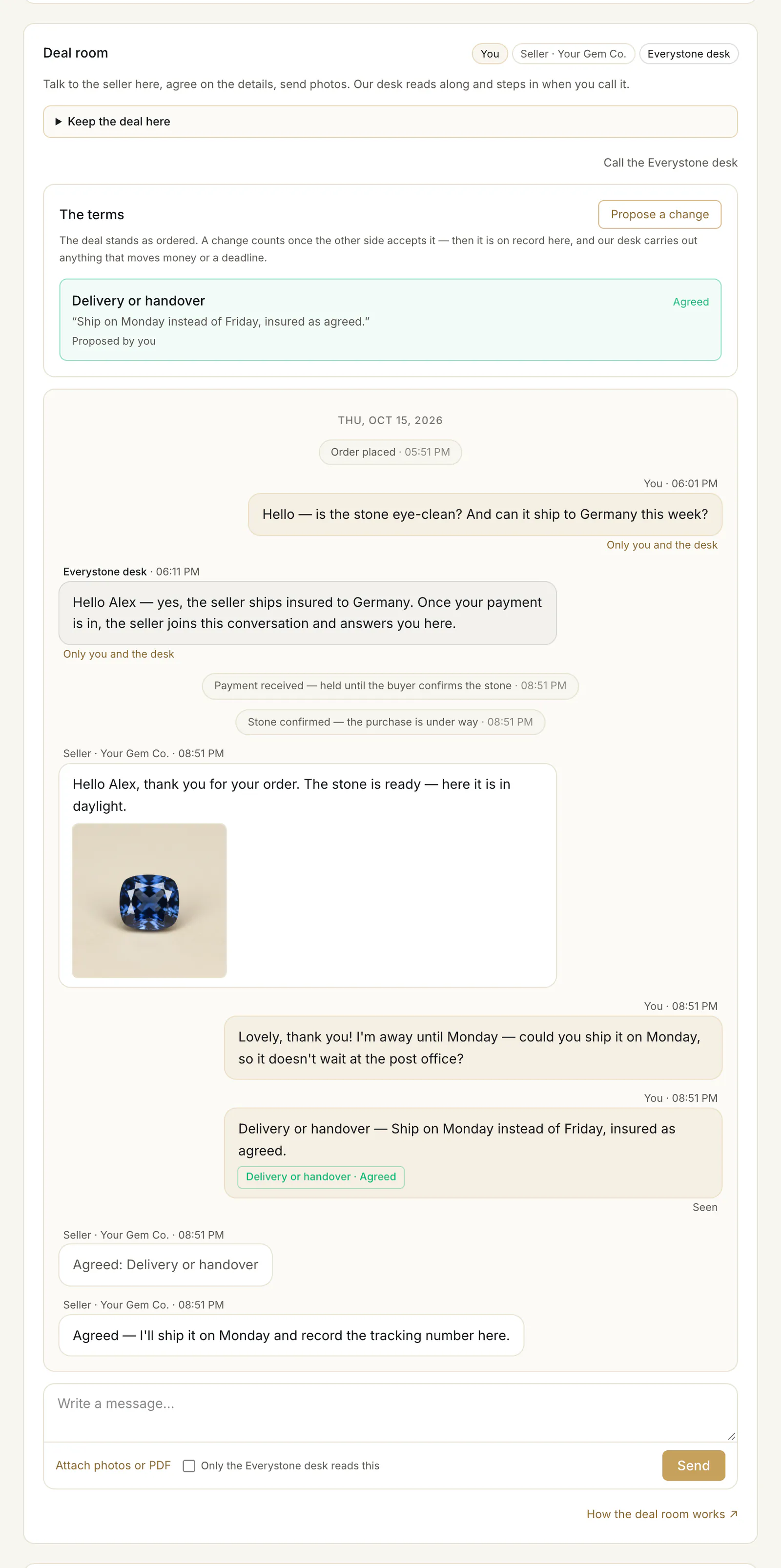
- 1.Open the order: as a buyer, Open your order → on your dashboard; as a seller, Open the sale → next to the sale.
- 2.Scroll to Deal room, type in “Write a message…” ④ and press Send. On a computer, Enter sends and Shift+Enter starts a new line.
- 3.To show something, press Attach photos or PDF ⑤: up to 4 files a message — JPG, PNG, HEIC or PDF, up to 8 MB each. A photo straight from an iPhone (HEIC) is fine. Photos are kept without the place, time and device your phone writes into them.
- 4.Something only our desk should read? Tick Only the Everystone desk reads this ⑥ before you send.
A business collecting its stone at a jewelry store sends here the notarised power of attorney for the person who will collect it, with that person's full name — tick Only the Everystone desk reads this for it. See Buying as a business.
New messages appear by themselves. If you are not looking, we email you once — without the message itself — and not again until you have opened the conversation. Your order lists show “new message” next to an order that has something unread.
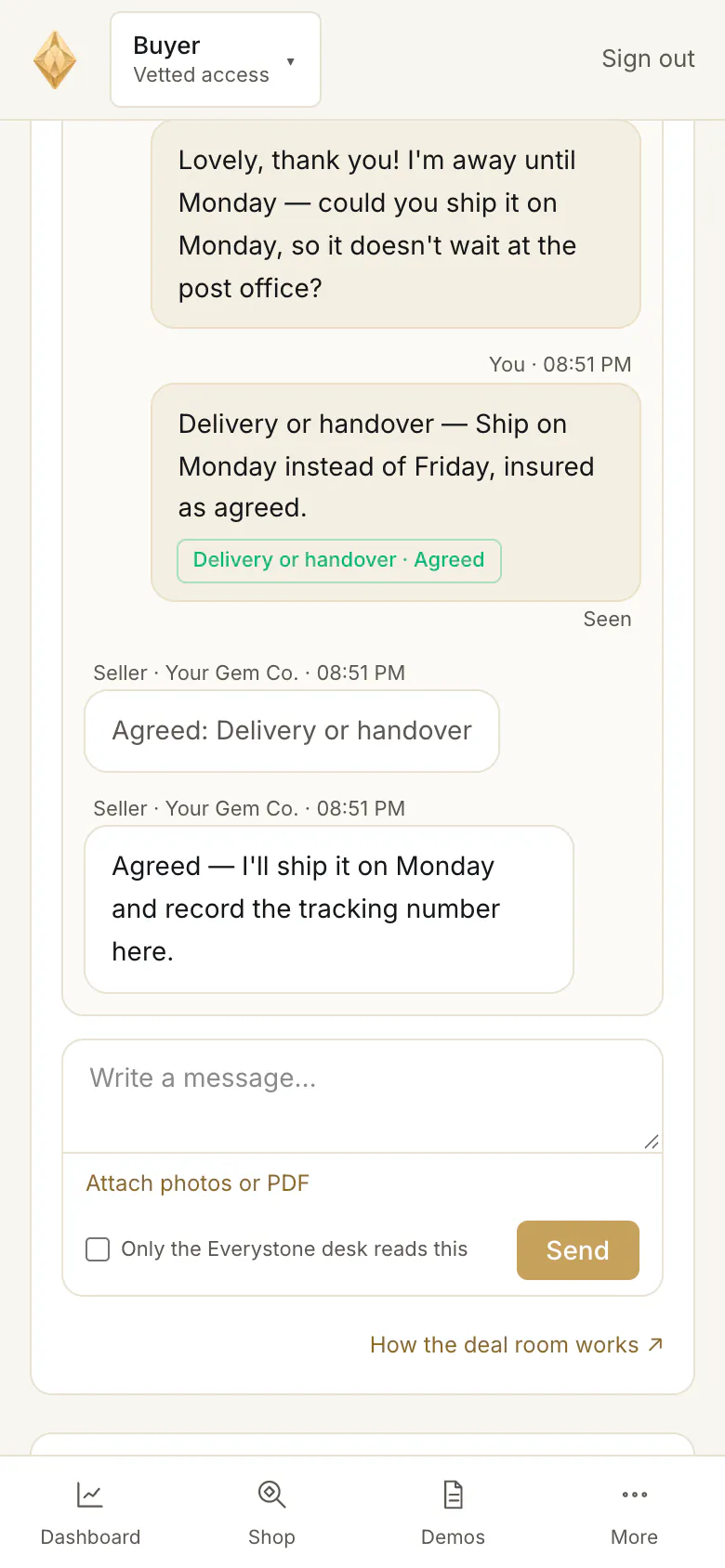
What you can't send
- Payment details — a wallet address, a bank account, PromptPay, a card number, a payment link. The only way to pay is your order page. A message with payment details is not sent, and you see why.
- Contact details — a phone number, an email address, a messenger, a link to another site — are sent, but our desk sees them, and you are reminded that a deal moved off Everystone loses the protected payment, and our desk can't help with it.
Change the terms
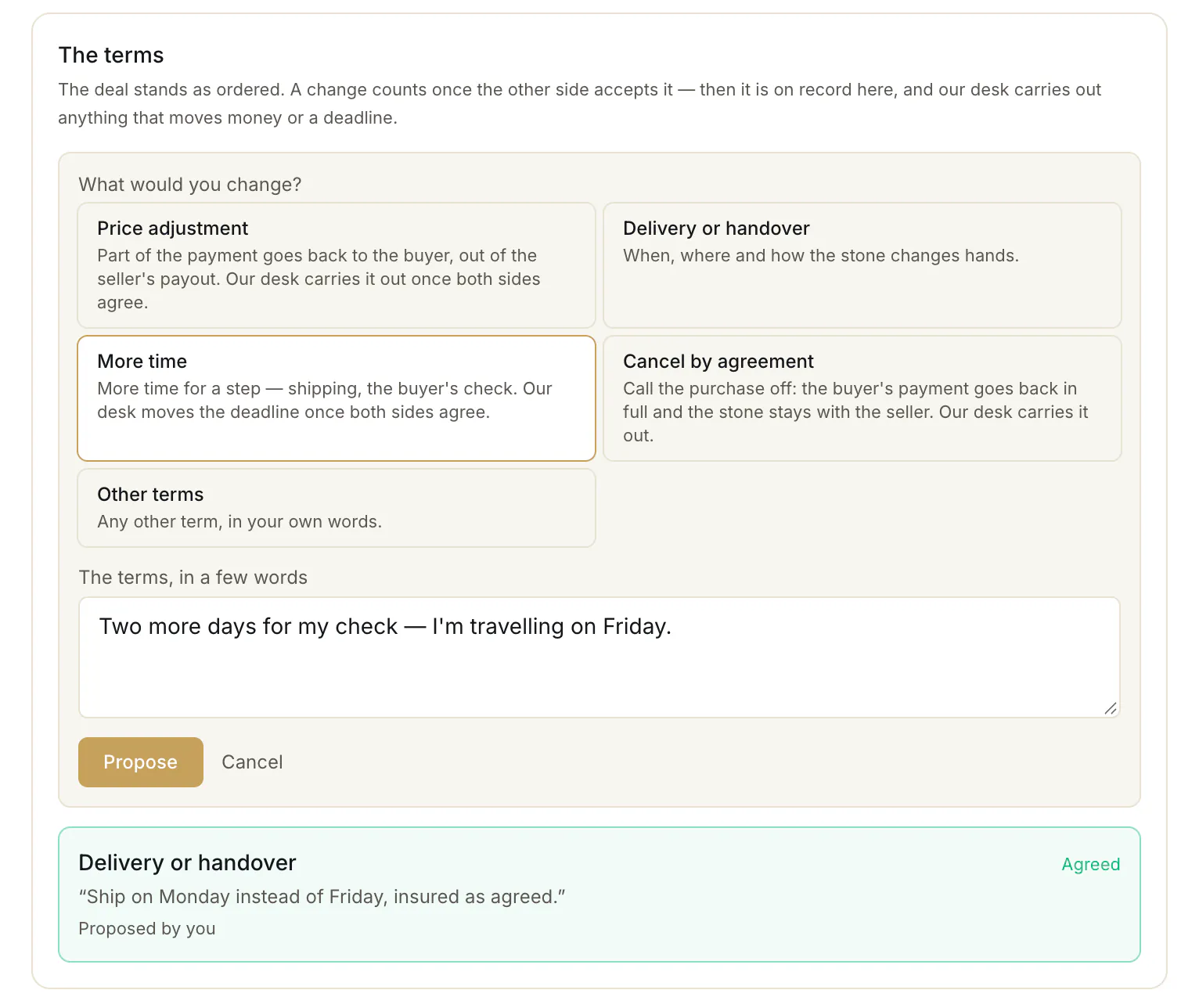
The deal stands as ordered. To change something, use Propose a change under The terms:
- 1.Choose what to change ①:
- Price adjustment — part of the payment goes back to the buyer, out of the seller's payout. Enter the amount in USD; it must be less than the price (calling the whole purchase off is a cancellation).
- Delivery or handover — when, where and how the stone changes hands, before it does.
- More time — for a step such as shipping or the buyer's check.
- Cancel by agreement — the buyer's payment goes back in full and the stone stays with the seller.
- Other terms — anything else, in your words.
- 2.Describe it in a few words ② and press Propose ③.
- 3.The other side answers: Accept, Decline, or Propose something else — a proposal of their own in answer to yours. While yours waits, you can Withdraw it.
What both sides accept is on record under The terms, marked “Agreed” ④. Nothing changes by itself: a price adjustment, more time or a cancellation is carried out by our desk on the order, and the room then says “Carried out by our desk.” — or why it could not be.
You can propose while the payment is held — from the payment until the buyer accepts the stone — and at most 3 proposals can wait for an answer at once.
The deal room: who speaks when, and how a change is agreed
| Before the payment | Payment held | After the buyer accepts | Closed, for 14 days | After that | |
|---|---|---|---|---|---|
| The buyer writes | Yes | Yes | Yes | Yes | —No |
| The seller writes | —No | Yes | Yes | Yes | —No |
| Either side proposes a change | —No | Yes | —No | —No | —No |
| Our desk writes | Yes | Yes | Yes | Yes | Yes |
One side
Propose a change
Price adjustment · Delivery or handover · More time · Cancel by agreement · Other terms. At most 3 wait for an answer at once.
The other side
- Accept → “Agreed”
- Decline → nothing changes
- Propose something else → a proposal back, the same way
Agreed: Price adjustment, More time, Cancel by agreement
Our desk carries it out on the order — then “Carried out by our desk.”, or why it could not be.
Agreed: Delivery or handover, Other terms
On record in the room; both sides do as agreed.
Stuck at any point? Call the Everystone desk — everyone in the room sees the call, and a person from our desk joins.
Call our desk
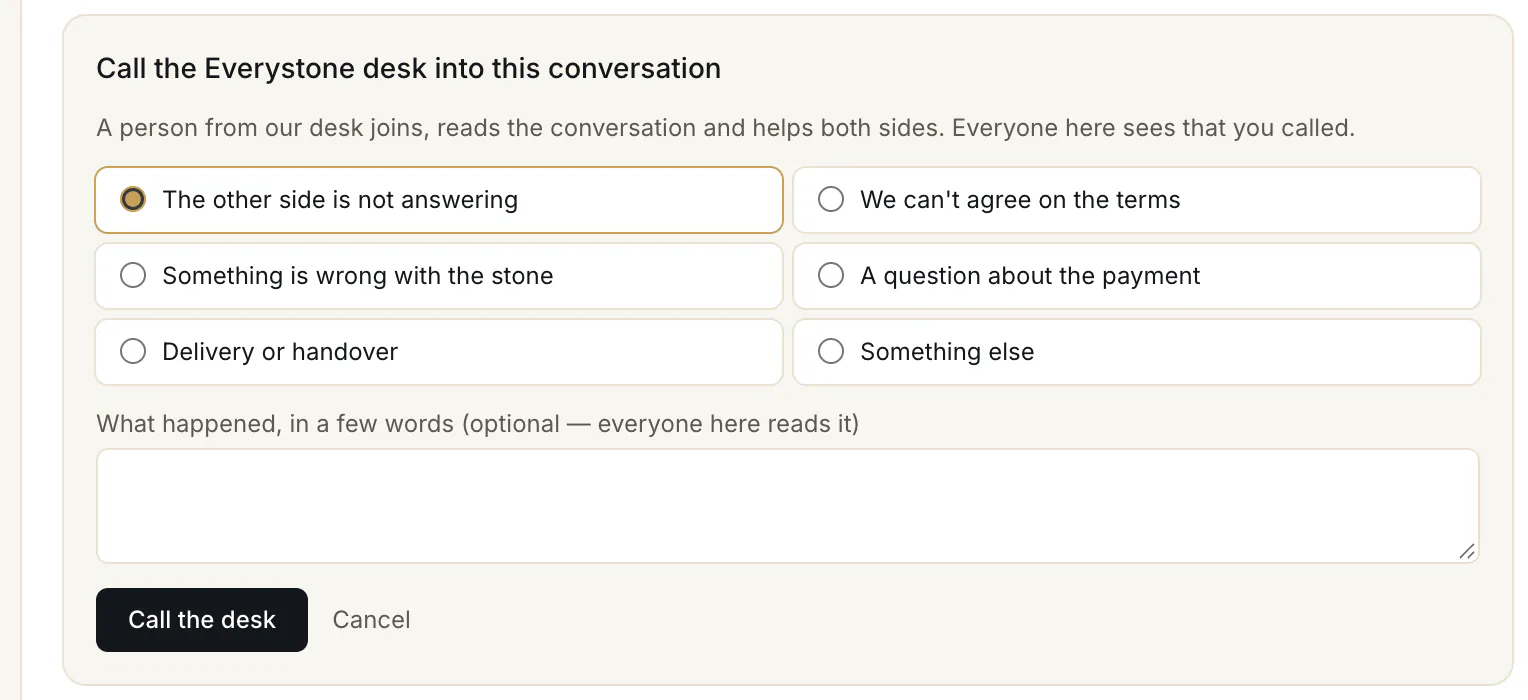
When you can't agree, the other side goes quiet, or something is wrong:
- 1.Press Call the Everystone desk (⑦ in the first picture).
- 2.Choose why ① — “The other side is not answering”, “We can't agree on the terms”, “Something is wrong with the stone”, “A question about the payment”, “Delivery or handover” or “Something else” — and add a few words ② if you like. Everyone in the room reads them.
- 3.Press Call the desk ③.
Everyone in the room sees that the desk was called. A person from our desk joins the conversation, answers both sides — or one of you — and closes the call when it is settled.
Common problems
"Payment details can't be sent here"
Your message contains a wallet address, a bank account, a card number or a payment link. Remove it and send again. To pay, use the payment on your order page — never a transfer the other side asks for in a message.
The seller doesn't answer
Give them a little time — the seller has their own deadline to confirm the stone, shown on your order page. If they stay silent, press Call the Everystone desk and choose “The other side is not answering”.
A message says "Removed by the Everystone desk"
Our desk took a message out of the conversation — usually because it carried contact or payment details. A proposal taken out is set aside and can no longer be accepted.
I can read the conversation but not write
Either our desk has paused it — its last message says so — or the order closed more than 14 days ago. Write to us by email if you need anything.
I am a seller and I don't see the room
It opens once the buyer's payment is in. Until then your sale shows “Reserved — the buyer is paying”.
Read next
- Next in BuyersHow your stone reaches you: insured delivery or collectionThe delivery choices at checkout, who sets the price of insured delivery, how collection by appointment works, and what happens when the stone stays in custody.
- RelatedYour 48-hour check: confirm the stone, or raise a disputeOnce the stone reaches you, you have 48 hours to check it: how to confirm, how to dispute with a written conclusion, how to ask for more time.
- RelatedWhen a buyer pays: confirm the stone, send it, get paidWhat to do when a buyer pays for your stone: confirm it within 48 hours, ship it insured with tracking and seal numbers or hand it over, and when you are paid.
Something here doesn't match what you see? Tell us — write to the desk.