

The identity check: when it is needed and how to pass it
A short check of who you are: name, country and a photo of your ID. When a buyer or a private seller needs it, how to send it, and what if it is returned.
Updated · 3 min read
 Illustration
- Who it's for
- Private buyers, and private owners who want to sell. A verified dealer or jewelry store buys on its business verification instead.
- What you need ready
- Your full legal name and country of residence.
- A photo or scan of your passport or national ID.
- How long it takes
- About two minutes to send. The desk reviews it, usually within a business day.
- What it costs
- Free.
When you need it
In one line: the identity check is “needed before the stone is handed over to you and before your next purchase — you can order without it”.
- To order and pay: not needed. The checkout offers it as an option.
- Before the stone is handed over to you: needed. Your order goes ahead in the meantime.
- If the desk asks for it on an order: you have 48 hours. Without it by then, the order is cancelled and your payment comes back in full.
- Before your next purchase: once one of your orders has been paid, the next one waits for the check.
- To sell a stone you own: “Selling needs a verified identity.”
- Buying for a verified business: not needed — a purchase from a verified Dealer or Jewelry store workspace rests on the business check.
When the identity check is needed
At checkout
OptionalAdd a short identity check now and tick Send this identity check with my order.Paying your first purchase
Not needed“optional: you can pay straight away either way”If our desk asks for it
Needed“Your identity check is needed”, with a date. Not sent by then: the order is cancelled and your payment comes back in full.48 hoursBefore the stone is handed over
NeededYour order goes ahead meanwhile; the stone waits for the check, and so does the seller's payout.Your next purchase
Needed“Before your next purchase: a short identity check.”
Three ways in
- 1.At checkout: open Add a short identity check now, fill it in and tick Send this identity check with my order.
- 2.On your order page: the card “A short identity check” has Add your identity check.
- 3.From your dashboard: the card “Identity check (KYC)” has Verify identity. Or open the identity check directly.
Fill it in
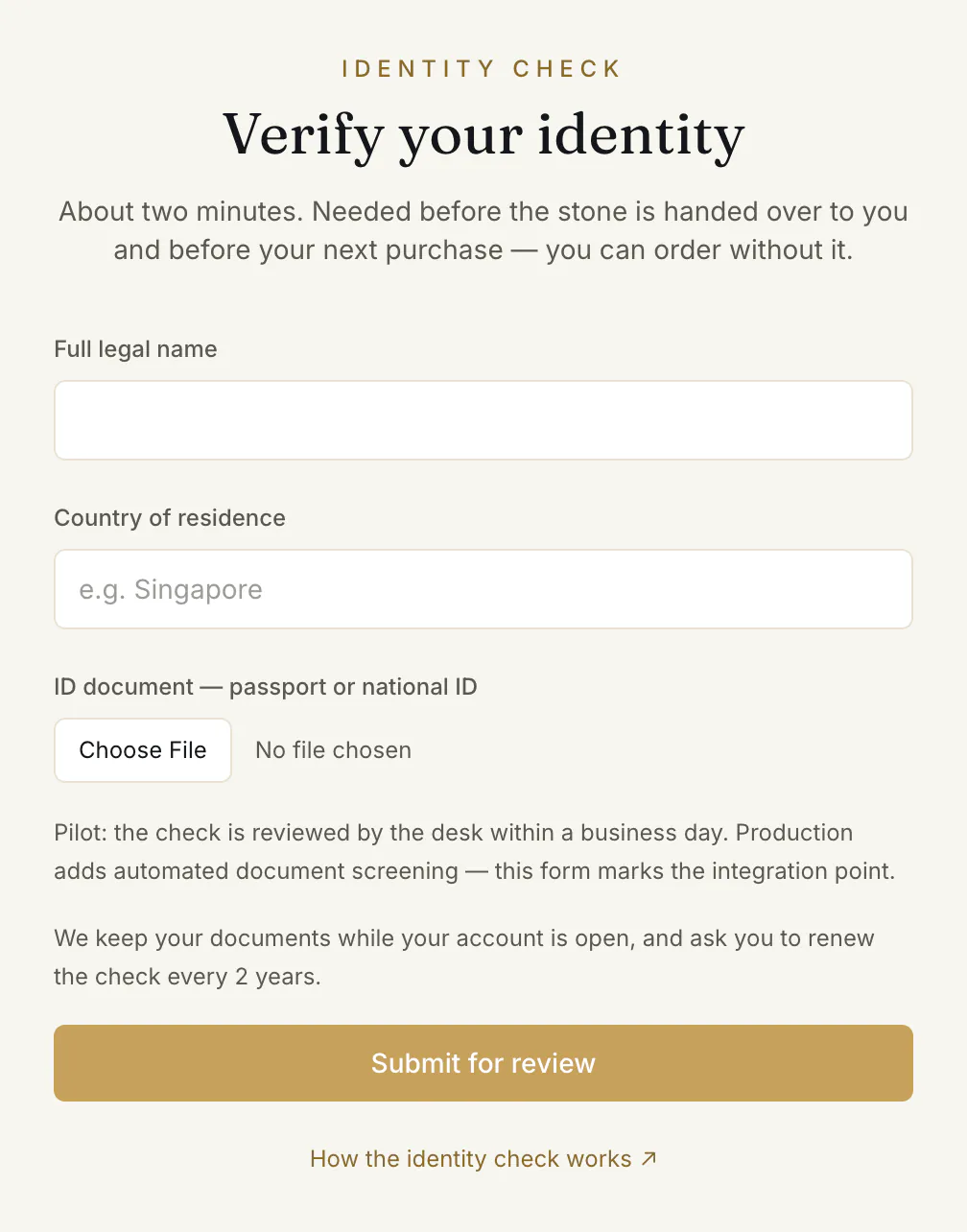
- 1.Full legal name ① — as on your document.
- 2.Country of residence ②.
- 3.ID document — passport or national ID ③ — a photo or scan: JPG, PNG, HEIC or PDF, up to 8 MB. A photo straight from an iPhone (HEIC) is fine.
- 4.Press Submit for review ④.
The page then shows “In review”: “The desk is reviewing your details.” It updates itself. Browsing the shop is never blocked while you wait, and if you came from an order, Back to your order takes you there.
The decision
It comes by letter, and the page changes with it.
- Verified: “You're verified”. Press Continue. Your dashboard shows Verified, and from now on every purchase goes straight to payment.
- Returned: the page says “One more pass needed”, with “The desk returned your check:” and the reason. Your details are kept. Fix what the reason names — replace the ID file only if the reason is about it — and press Resubmit for review.
Every two years
A check holds for two years from the desk's decision; your identity page shows “Valid until” its date. Then it is renewed:
- 1.From 30 days before, a reminder appears in your cabinet, and the identity page says “Renew your identity check”.
- 2.Send a current photo of your ID and press Submit the renewal. Your check stays verified while the desk reviews it — the page says “Your renewal is with the desk”.
- 3.Not renewed in time, it counts as not done: “Your identity check has expired”. Your next purchase, and the hand-over of a stone you bought, wait until it is renewed.
Common problems
“A photo or scan of an ID document is required.”
The first check always needs the ID file. Add it and submit again.
“That file didn't go through”
“That file didn't go through” — it takes JPG, PNG, HEIC or PDF, up to 8 MB. Take a sharper, smaller photo, or save the scan as a PDF.
The desk asked for it on my order
Your order page shows “Your identity check is needed” and a date. Send it before then; once it is with the desk, the date no longer cancels the order — the desk's decision does.
At checkout I filled it in, but it was not sent
The checkout sends it only when you tick Send this identity check with my order, or attach a new ID photo. If something was missing, the order page says so — “Your identity check was not sent” — and the order goes ahead either way. Add it from the order page.
Read next
- RelatedHow to buy a stone: from the lot page to your orderOpen a lot, press Buy with protected payment, choose what to add and how the stone reaches you, then confirm. What each choice means and what happens next.
- RelatedSelling a stone you own, as a private ownerHow a private owner puts a stone from their collection on the shop — identity check, price, delivery terms, the owner account, the review — and the costs.
Something here doesn't match what you see? Tell us — write to the desk.