

Selling a stone you own, as a private owner
How a private owner puts a stone from their collection on the shop — identity check, price, delivery terms, the owner account, the review — and the costs.
Updated · 3 min read
 Illustration
- Who it's for
- Private owners with a stone in their Owner workspace.
- What you need ready
- The stone in your collection — bought here, or brought in and verified.
- Your identity check, verified.
- USDT to pay the owner account, or a payment arranged with the desk.
- How long it takes
- A few minutes to set up. The desk confirms your payment, usually within a business day, then reviews the lot.
- What it costs
- The owner account is $20 a month, paid when the lot goes live. Commission when it sells: no commission while we launch under $10,000, 5% from $10,000.
Before you start
- The stone must be in your collection. A stone you own from elsewhere is brought in and verified first — see Bring in a stone you own.
- Your identity must be verified. “Selling needs a verified identity.” See The identity check.
1. Open the stone and press “Sell this stone”
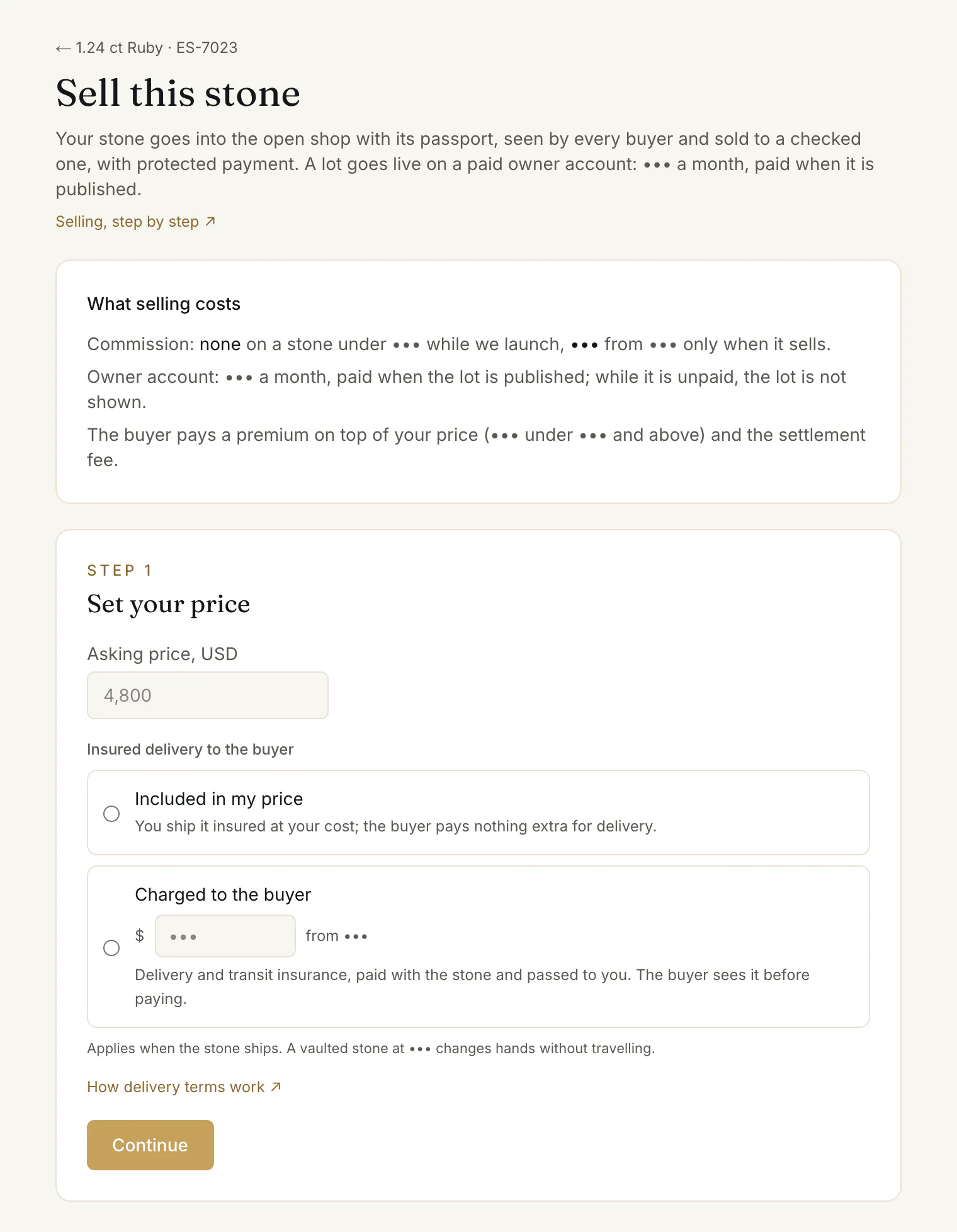
In your collection, open the stone and press Sell this stone. The page “Sell this stone” starts with “What selling costs” ①:
- the commission — no commission while we launch on a stone under $10,000, 5% from $10,000, only when it sells;
- the owner account — $20 a month, paid when the lot is published; while it is unpaid, the lot is not shown;
- the buyer pays a premium on top of your price, and the settlement fee.
If the stone is in custody, it sells without leaving the vault, and its subscription carries on until the title moves.
2. Set your price and delivery terms
Step 1, “Set your price”:
- 1.Asking price, USD ② — between $100 and $10,000,000.
- 2.Your delivery terms ③: insured delivery included in your price, or charged to the buyer — see Delivery terms. A stone in custody sold from $30,000 needs none: it does not travel.
- 3.Press Continue ④.
Your lot is now a draft.
3. Pay the owner account
Step 2 asks you to pay the owner account, $20.
- 1.Send $20 in USDT to the platform address the page shows — on the TRON (TRC-20) or the Ethereum (ERC-20) network.
- 2.Choose how you paid — TRC-20 hash, ERC-20 hash or Other reference — and paste the transaction hash.
- 3.Press the button that confirms you have paid.
If the page shows no address, pay by arrangement with the desk — write to us — and paste the transfer reference instead.
The page thanks you: “Thank you. The desk will confirm your payment shortly.” The desk checks the transfer, usually within a business day.
4. The desk reviews the lot
Step 3, “In review”: “The desk reviews the lot before it goes live in the shop.” One paid month covers all your lots: a second stone you put on sale in the same month goes straight to review.
5. Live in the shop
“Live in the shop”, with See the lot ↗ and Renew the account. Buyers see a private owner as the seller, with “Owner verified (ID)” — never your name.
When the paid month ends without a renewal, the lot is hidden: “Hidden: the owner account has lapsed”. Pay again from the same page or from Billing, and it comes back.
6. When a buyer pays
You confirm the stone within 48 hours, hand it over or ship it, and you are paid after the buyer accepts it. Your dashboard shows it under “Your sales”. See When a buyer pays.
A sale, from your side
“Reserved — the buyer is paying”
Nothing to do yet. Keep the stone for the buyer; the lot can't be withdrawn meanwhile.24 hours, 48 hours at most“Paid — confirm the stone”
Confirm the stone — or Not available if you no longer have it.Within 48 hoursUnconfirmed at 96 hours, the order closes and the buyer is refunded.
Payment held“Confirmed — under way”
Ship it insured, enter the Tracking number and Seal number, press Shipped. Or hand it over, then Handed over to the buyer. The buyer then confirms they have it. If they added a check or custody, our desk arranges the hand-over.Payment held“Delivered — the buyer is checking”
The buyer checks the stone; silence counts as acceptance. A dispute: see below.48 hours
Payment held“Accepted — payout due”, then “Paid out”
You receive your price, less any commission, plus your delivery charge if you set one.
If the buyer disputes the stone
“Disputed — the stone comes back to be checked”. The buyer has 48 hours to send it back, insured. When it arrives, press The stone has arrived, then It is the stone I sent — the buyer is refunded and you keep the stone — or It is not the stone I sent, with proof, for our desk to decide. Not sent back in time, the sale stands. A private owner's stone is checked by our desk.
Take the lot off sale
Take the lot off sale at the bottom of the page — not while a buyer's order holds the stone.
Common problems
“That reference does not look right”
“a TRC-20 hash is 64 hexadecimal characters, an ERC-20 hash starts with 0x.” Copy the hash from your wallet again, or choose Other reference.
“A payment is already waiting for the desk to confirm it.”
You have sent one already. Wait for the desk; the page moves on once it is confirmed.
“This stone already has a lot.”
The stone is already on sale, in review or in a draft. Open it from your collection to see where it stands.
The desk could not confirm my payment
The page shows “The desk could not confirm your last payment:” with the reason. Check the hash, and submit again.
Read next
- Next in Private sellersDelivery terms: included in your price, or charged to the buyerThe one delivery question on every listing — insured delivery included in your price, or a charge you state — what the buyer sees, and how it is paid to you.
- RelatedWhen a buyer pays: confirm the stone, send it, get paidWhat to do when a buyer pays for your stone: confirm it within 48 hours, ship it insured with tracking and seal numbers or hand it over, and when you are paid.
- RelatedThe identity check: when it is needed and how to pass itA short check of who you are: name, country and a photo of your ID. When a buyer or a private seller needs it, how to send it, and what if it is returned.
Something here doesn't match what you see? Tell us — write to the desk.