

Jewelry stores: selling your own inventory, buying from dealers
What differs for a jewelry store — the same business verification, your own stock only, an origin declaration instead of consignment papers, free buying.
Updated · 5 min read
 Illustration
- Who it's for
- Jewelry stores with a Jewelry store workspace.
- What you need ready
- A Jewelry store workspace — verified, or in preparation.
- For each stone you list: where it comes from — bought with documents, your own production, or estate / buy-back.
- How long it takes
- A few minutes per stone.
- What it costs
- The plan is free while we launch. Selling a stone under $10,000: no commission while we launch; from $10,000: 5%, only when it sells.
The same verification as a dealer
A jewelry store passes the same two-step business verification: company details, then the company registration and the director's ID. See Verify your business. Until it is approved your cabinet runs in preparation mode: you can add stones as drafts, and they publish with one click afterwards.
Business verification, step by step
Your company
Business name, registration number, director, country — then Continue to documents. Your workspace opens now.Two documents
The company registration and the director's ID, a photo or scan each — then Submit for review.“KYB in review — prepare while you wait”
Add stones — they are saved as drafts. You can buy from the shop meanwhile, checked as a person.The decision, by letter
- VerifiedYour drafts get Publish; every lot carries “Seller verified”.
- ReturnedReview and resubmit: fix what the reason names. Your details are kept — back to step 1.
Your menu
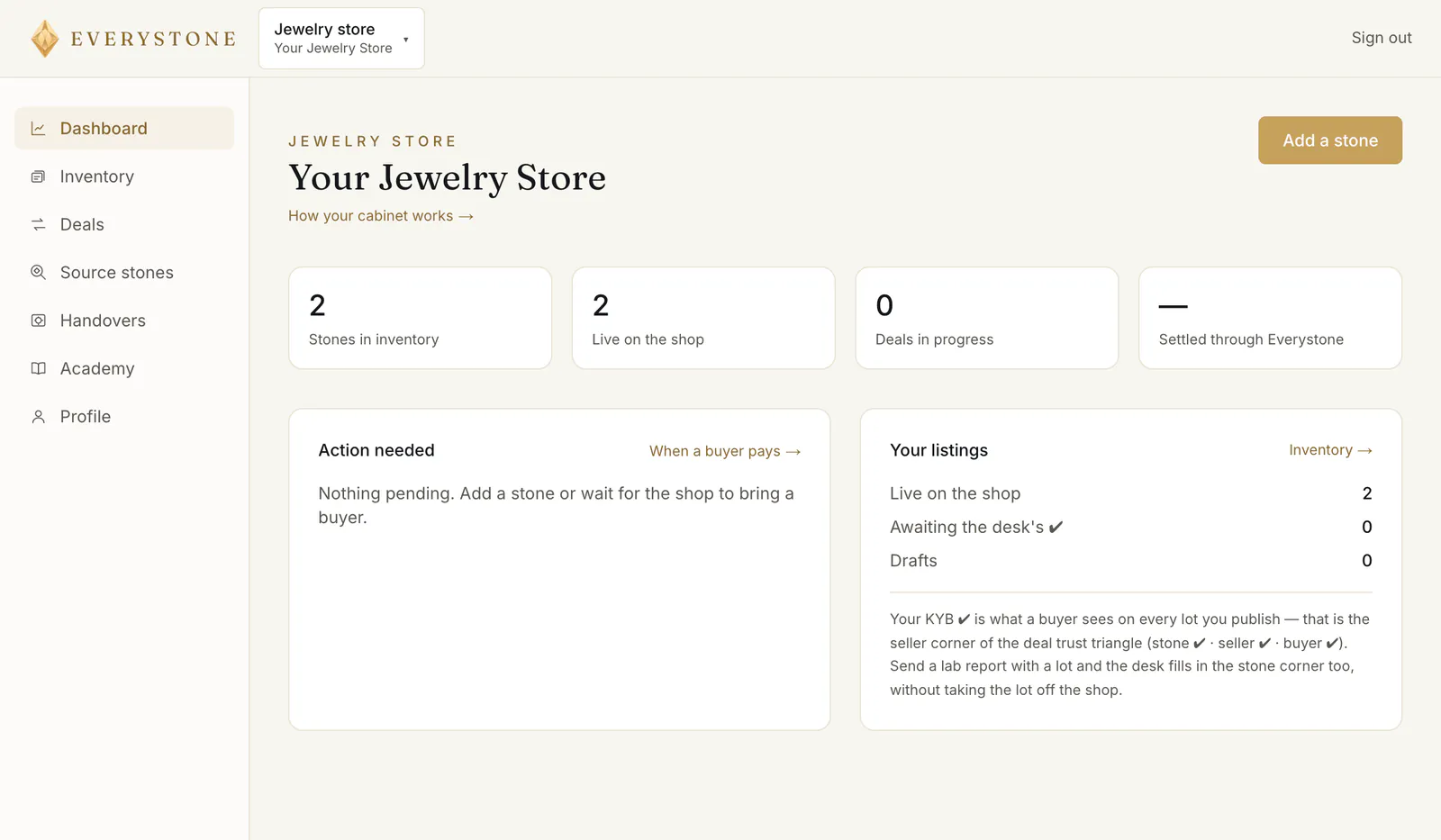
The menu ① holds Dashboard, Inventory, Deals, Source stones and Handovers ④ — the dealer's cabinet without At the counter, with a counter for buyers instead. On a phone, Handovers is under More in the bar at the bottom of the screen. The dashboard, inventory and deals work as they do for a dealer — see Your dealer cabinet.
You sell your own inventory
A jewelry store lists only stones it owns. Your inventory shows only your workspace's stones, and trying to list another one is refused: “A jewelry store lists only its own inventory.”
Listing a stone works as for a dealer — see List a stone for sale — with one difference: instead of consignment papers, you declare where the stone comes from.
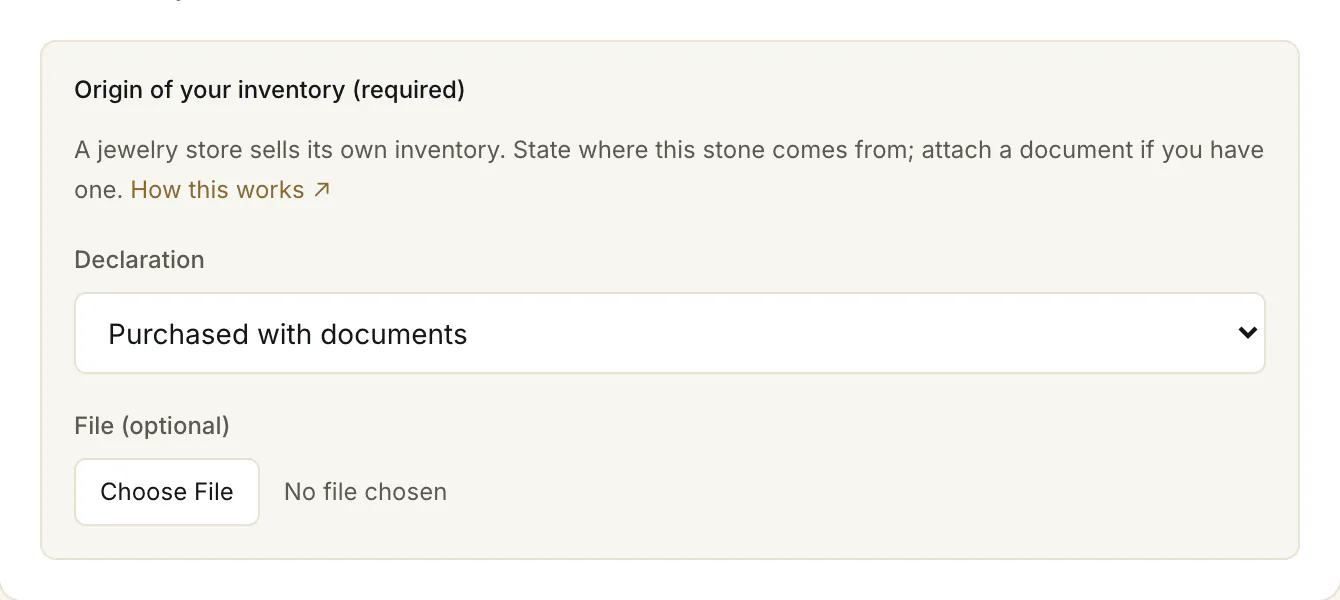
- 1.Press Add a stone (② in the first picture) and fill in the stone, its report if any, its origin and treatment, the price and your delivery terms.
- 2.Under “Origin of your inventory (required)”, choose Purchased with documents, From our own production or Estate / buy-back ①. Attaching a document ② is optional.
- 3.Press Publish to the shop.
The listing form takes loose stones.
Buying from dealers
Source stones opens the shop. You buy like anyone else, with the same protected payment — see How to buy a stone. Your purchases are under Deals → Buying. Once your business is verified, you need no personal identity check to buy. Every stone you buy joins your inventory when the purchase is accepted, ready to list again: its record moves to you, or — for a stone that had none with us — one is made for you, with the seller's description and nothing marked as checked that was not.
Hand over stones to buyers
Your store can be a pickup point: a buyer of any stone that ships — from any seller on Everystone — can choose to collect it at your counter. They pay a handover fee of $30 with the stone, and it is paid to your store.
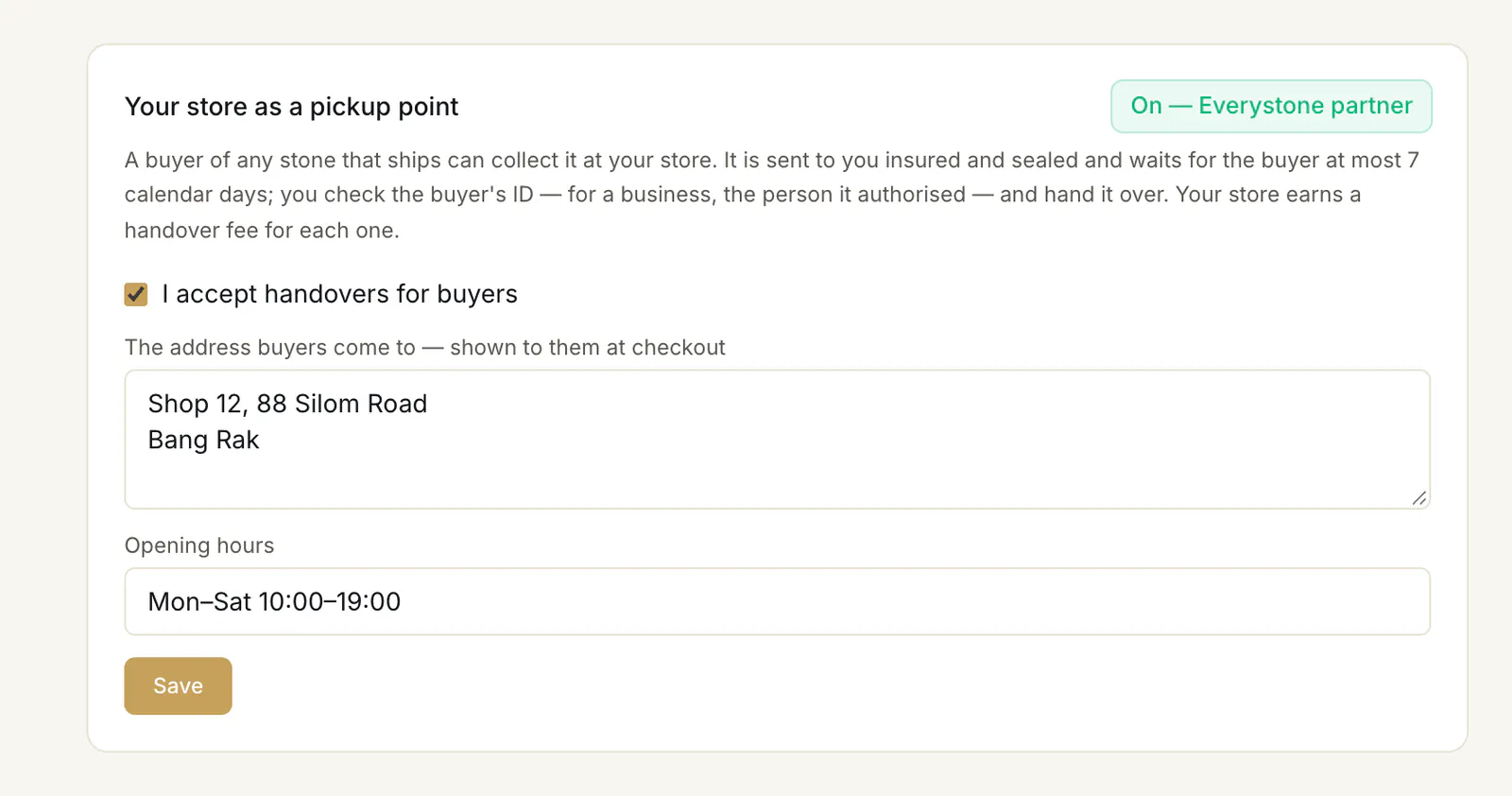
- 1.Open Handovers. It opens once your business is verified.
- 2.Tick I accept handovers for buyers ①, type the address buyers come to ② and your opening hours ③, and press Save ④. Buyers see your store's name, city, address and hours at checkout. Our desk may mark your store an Everystone partner: it is then listed first, with a badge, and your page says “On — Everystone partner” ⑤.
Below the switch, “Coming and waiting” lists every stone a buyer chose to collect at your store:
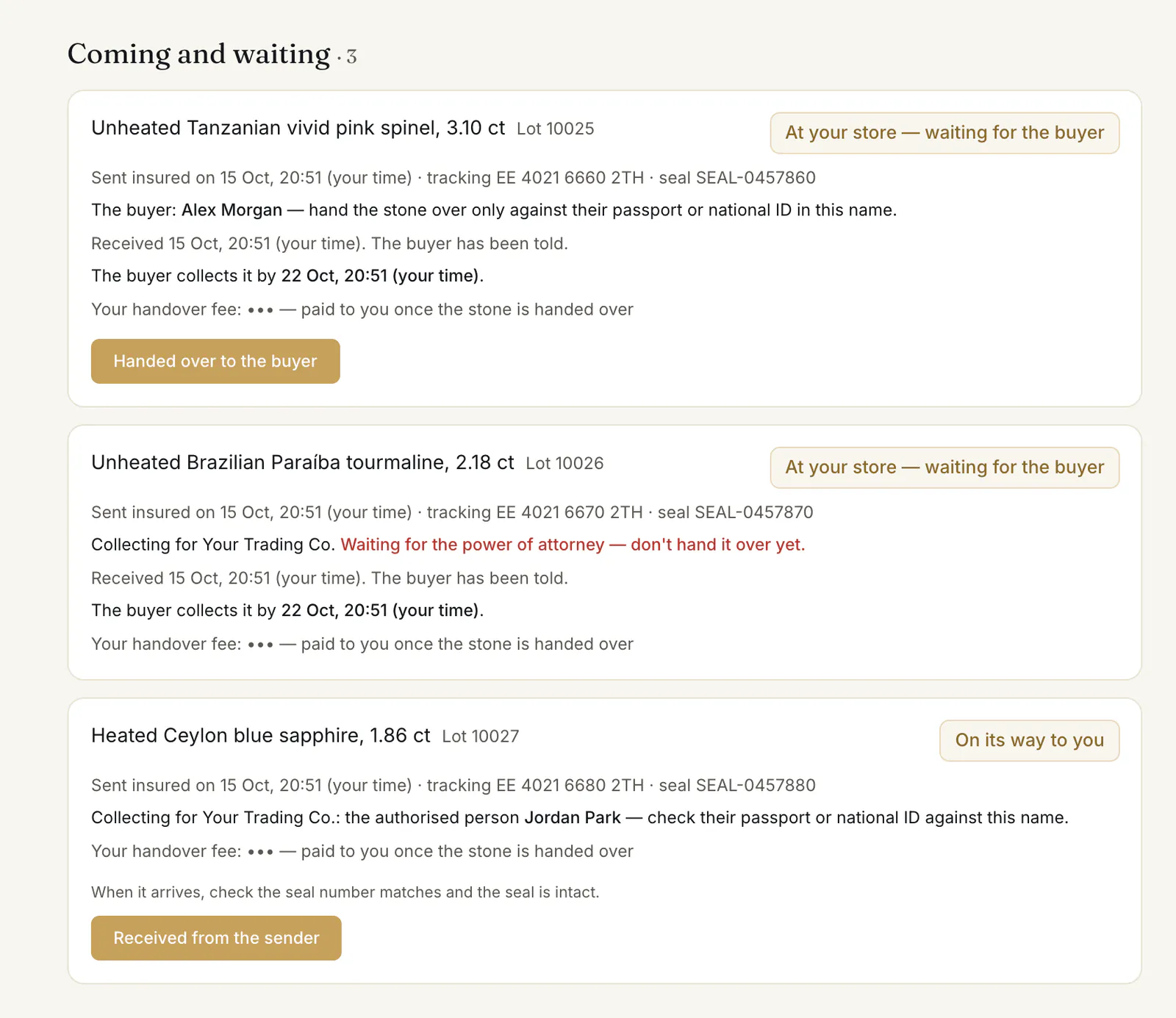
- 3.When a buyer chooses your store, the stone is sent to you insured, with a tracking number and a numbered seal, and we write to you. Your Handovers page shows it as “On its way to you”.
- 4.When it arrives, check the seal is intact and press Received from the sender ⑥. We tell the buyer it is waiting, with your address, your hours and the date to collect it by — 7 calendar days from its arrival. Your Handovers page shows that date too: “The buyer collects it by” ②.
- 5.When the buyer comes, check their passport or national ID against the name your Handovers page shows ①, hand the stone over, and press Handed over to the buyer ③. Their 48-hour check starts then.
When the buyer is a business, it collects through a person it authorises, with a notarised power of attorney that our desk checks — you never see the document. Until then your page says “Waiting for the power of attorney — don't hand it over yet.” ④ and the button is not there; afterwards it names the company and the person: “Collecting for”… “the authorised person”… ⑤ — check that person's passport or national ID against the name.
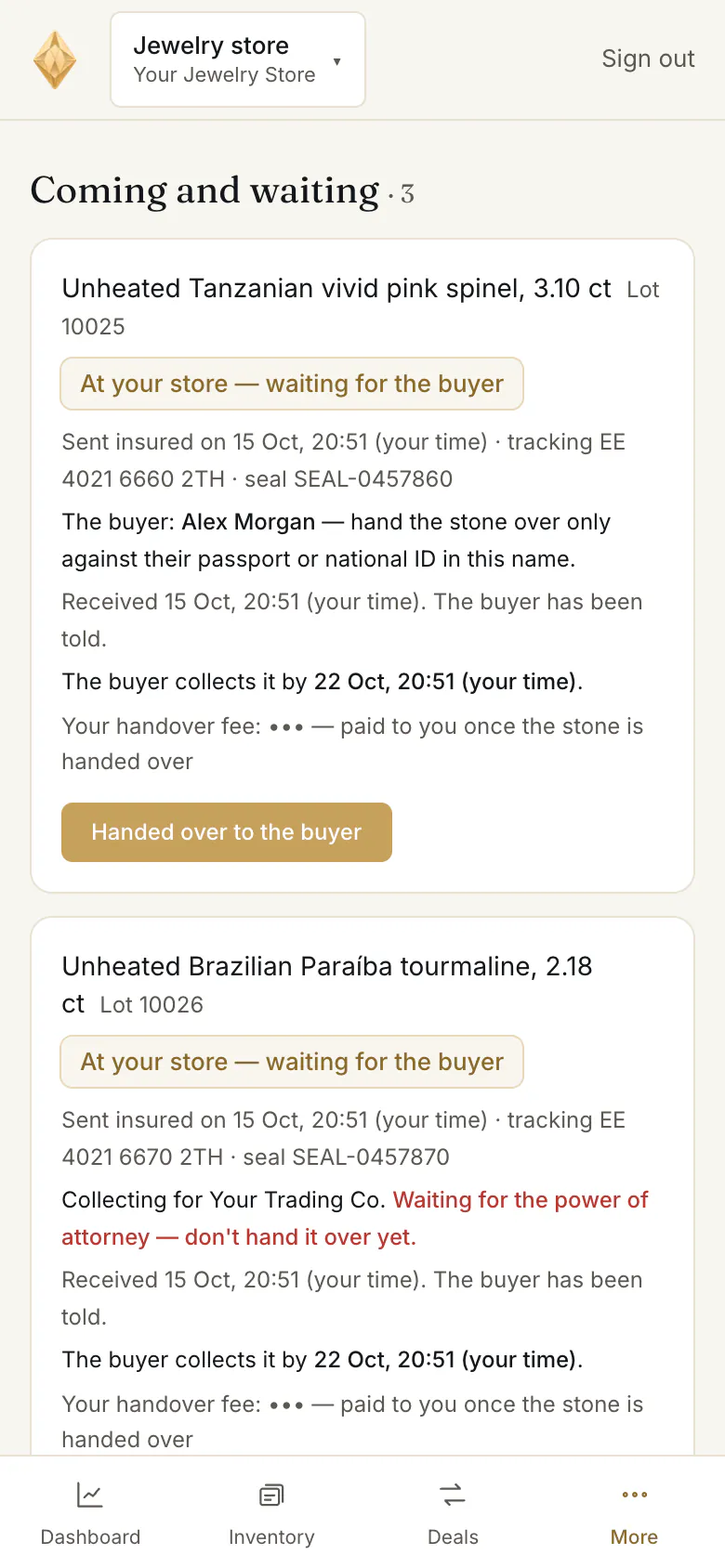
On a phone the list reads the same: a stone at your store shows “At your store — waiting for the buyer” ①, and Handed over to the buyer ② is under it.
If the buyer does not come in time, the purchase is off and the stone goes back to its seller. Your page then shows “Not collected — keep it for the return”: don't hand it to the buyer, keep it safe in its sealed parcel, and our desk writes to you about its collection for the return.
Your fee shows on each handover — “paid to you once the stone is handed over”, then the date and the transfer reference once we have paid it. You earn it when you hand the stone over: from then it is yours, whatever becomes of the purchase — even if the buyer later disputes the stone and gets their money back. If the order ends before the handover, no fee is due — except when the buyer did not come in time: then your store is paid the fee for keeping the stone. You can switch handovers off at any time; stones already on their way still come to you.
When a buyer pays for one of your stones
You confirm it, then ship it insured or hand it over, and you are paid after the buyer accepts it — see When a buyer pays. How the stone travels is set by your delivery terms.
Common problems
“Handovers open once your business is verified.”
Only a verified jewelry store can accept handovers. See Verify your business.
“A jewelry store lists only its own inventory”
The stone you tried to list is not in your workspace. Add it to your inventory first with Add a stone, declaring where it comes from.
The buyer's company sent someone, but there is no name on my page
The power of attorney has not been checked yet: your page says “Waiting for the power of attorney — don't hand it over yet.” Don't hand the stone over. We write to you as soon as our desk has checked it.
My stones did not go on the shop
While your business verification is in review, a stone you add is saved as a draft and shows “Awaiting KYB”. Once you are verified, press Publish.
Read next
- Next in Jewelry storesListing a stone: the form, the checks, and going liveHow to add a stone and put it on the shop — identity, lab report, origin and treatment, price band, delivery terms and documents — and what the buyer then sees.
- RelatedDelivery terms: included in your price, or charged to the buyerThe one delivery question on every listing — insured delivery included in your price, or a charge you state — what the buyer sees, and how it is paid to you.
- RelatedWhen a buyer pays: confirm the stone, send it, get paidWhat to do when a buyer pays for your stone: confirm it within 48 hours, ship it insured with tracking and seal numbers or hand it over, and when you are paid.
- RelatedHow to buy a stone: from the lot page to your orderOpen a lot, press Buy with protected payment, choose what to add and how the stone reaches you, then confirm. What each choice means and what happens next.
Something here doesn't match what you see? Tell us — write to the desk.